Sequential fade-ins, or the fading in of elements one after the other, establish a sense of professionalism for a website. Additionally, the fade-in helps guide the user's eyes to the content you find most important.
Since sequential fade-ins rely extensively on proper usage of jQuery's .delay() method, I felt it would benefit you to learn the mechanics of .delay() through this practical example.
Understanding .delay() and for loop mechanics
The logic behind the sequential fade in is fairly straightforward: Go through each element of the wrapped set and fade it in. Simple, right?
So simple that this for loop might seem correct.
for(var i=0; i<$(wrapper).length; i++)
{
   $(wrapper[i]).delay(1000).fadeIn(500);
}
But the demo shows that everything comes up at once. Why is that? Two reasons.
- JavaScript does not pause between loop iterations
- .delay() is not global
JavaScript does not pause between iterations
.delay() and setTimeout do not halt or delay JavaScript from iterating code. JavaScript will iterate through a loop as many times as conditions allow it in just a few milliseconds.
Assuming our $(wrapper) contains 3 elements, JavaScript sees our for loop
for(var i=0; i<$(wrapper).length; i++)
{
   $(wrapper[i]).delay(1000).fadeIn(500);
}
As equal to these three separate statements.
$(wrapper[0]).delay(1000).fadeIn(500);
$(wrapper[1]).delay(1000).fadeIn(500);
$(wrapper[2]).delay(1000).fadeIn(500);
JavaScript executes statements so fast that for our purposes, we can assume JavaScript executes these statements simultaneously.
Loop iterations operate in direct contrast to jQuery's method "chaining". Consider the jQuery chain
$(wrapper).fadeIn(500).fadeOut(500);
fadeOut does not attempt to happen at the same time as fadeIn. fadeOut is placed in a queue and waits for the fadeIn animation to complete.
The following also causes fadeOut to happen after fadeIn, despite the fact that they are two separate statements.
$(wrapper).fadeIn(500);
$(wrapper).fadeOut(500);
This is because the JavaScript queue is global, and no matter where a statement is executed, it has to go through the same queue-check. Even though the fadeIn and fadeOut methods are in separate statements, JavaScript recognizes that $(wrapper) is under animation, and places fadeOut in the queue for $(wrapper) until the fadeIn animation is complete. But for best coding practices, that type of code should just be chained to one line.
Here's a visual aid I use to remember the queuing differences between iterations and chains
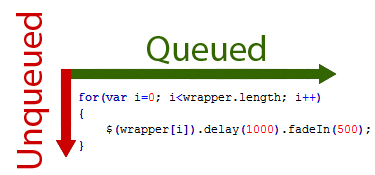
"Horizontal" chains are queued while "vertical" iterations (vertical because the loop goes back to the top and runs down the body of the loop) are NOT queued.
.delay() is not Global
.delay only applies to the queue of
one element at a time. Executing a delay on $(wrapper[0]) will have no effect whatsoever on $(wrapper[1]).
Therefore, JavaScript sees our for loop
for(var i=0; i<$(wrapper).length; i++)
{
   $(wrapper[i]).delay(1000).fadeIn(500);
}
Like this

A Working Sequential Fade-In
Now that you understand the mechanics of the .delay() method, you might be interested in seeing a working example of a Sequential fade-in effect. If you are, head over to
The Web Machine and view
Jeremy Carlson's solution.
June 18, 2010


 Joseph is the lead developer of Vert Studios
Follow Joseph on Twitter:
Joseph is the lead developer of Vert Studios
Follow Joseph on Twitter: